

What a tracker detector does
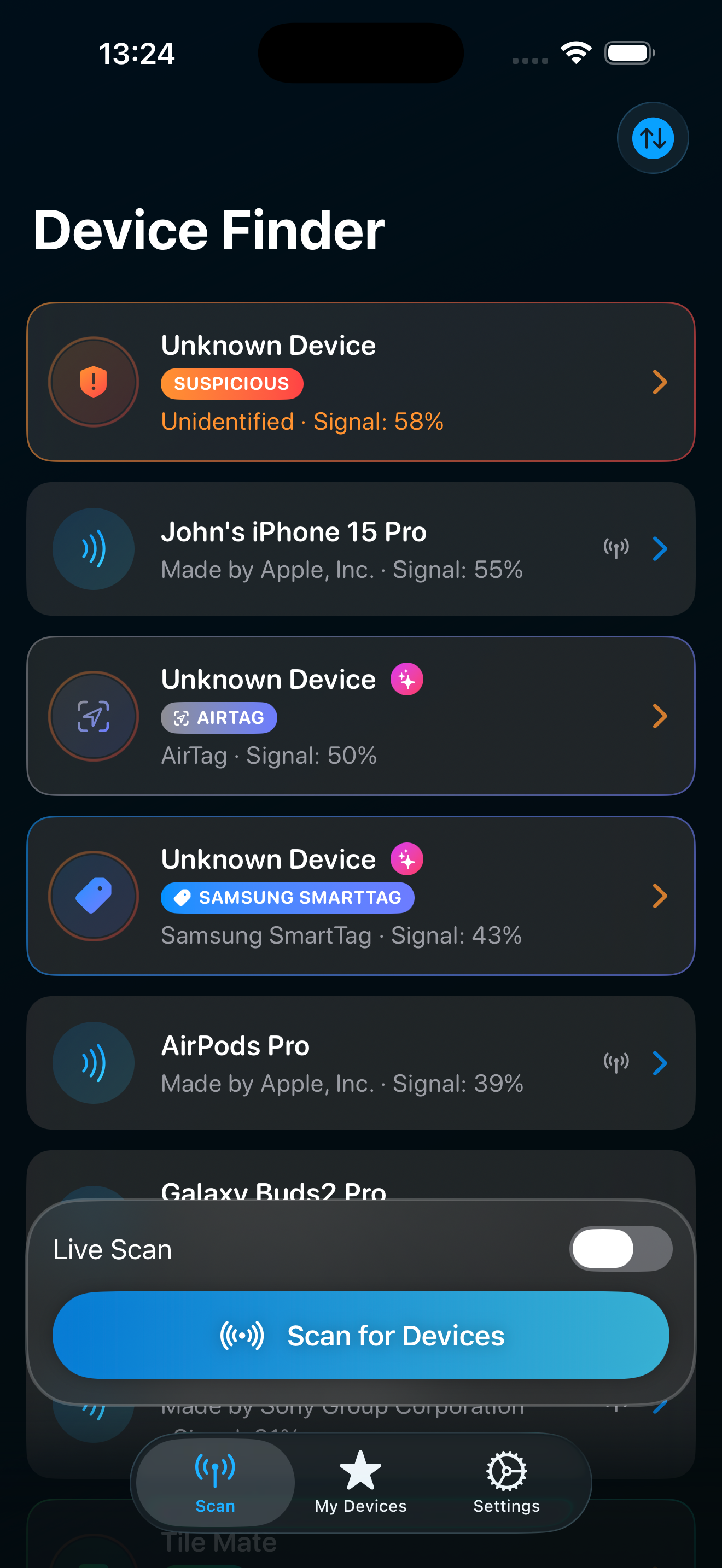
A tracker detector scans the Bluetooth signals around you and looks for small trackers that do not belong to you. TraceIt does three things in order. First it scans, listing every nearby Bluetooth device ranked nearest first. Then it flags the suspicious ones, the unknown trackers that keep appearing as you move. Finally it helps you find the physical device, so you are not left with a vague alert and no idea where to look.
The goal is calm and practical. Most of the Bluetooth devices around you are harmless, your own and your neighbors' gear. TraceIt is built to separate the normal background from the one tracker that follows you from your car to your coat to your front door, and then put that tracker in your hand.
How the Bluetooth detection works
Bluetooth trackers announce themselves over the air on a regular schedule so their owner's network can find them. TraceIt listens for those announcements with your iPhone. Each device shows up with its likely brand and a live signal strength reading, so you can tell at a glance what is near and what is far.
Signal strength is the heart of the finder. When you pick a device, the screen runs a warm and cold proximity finder. It gets warmer as you walk toward the tracker and colder as you move away, with haptics and sound backing it up so your eyes can stay on the room instead of the screen. That turns a flat list into a direction you can follow, which is the part most people actually need.
Which trackers it can detect
TraceIt detects unknown Bluetooth trackers, including AirTag and AirTag-style devices, Samsung SmartTag, Samsung SmartTag2, Tile, and Chipolo, along with other Bluetooth trackers that broadcast in a similar way. For the brands it recognizes there is a built in Learn about this brand explainer, so you know what you are dealing with.
One honest limit is worth knowing up front. On iPhone, AirTags that are still near their owner stay silent and Apple hides some of their data, so an iPhone app cannot reliably brand a separated AirTag on its own. TraceIt is strongest at surfacing the wider field of Bluetooth trackers and AirTag-style devices around you. It does not promise guaranteed detection of any single brand in every situation.
Finding a hidden tracker step by step
Open TraceIt and tap scan. Nearby Bluetooth devices appear, nearest first, with the suspicious ones flagged. Pick the device you want to track down. The proximity finder takes over from there.
Walk slowly and watch the reading warm up. As it gets warmer you are closing in, as it cools you are moving away. Let the haptics and sound guide the last few feet, then check the obvious hiding spots, under a seat, inside a bag lining, behind a bumper, in a coat seam. Bluetooth distance is approximate rather than a map pin, so the finder gets you to the right small area and your hands do the final search.
Telling your own devices apart from a stalker's
A good tracker detector should not cry wolf at your own earbuds. In TraceIt you can save the devices you own so they are recognized and never flagged as suspicious again. Your AirPods, your speaker, your own tag on your keys, all of them drop into the known list and stop cluttering the scan.
That leaves the alerts meaningful. When something unknown keeps reappearing across different places, it stands out precisely because everything you trust has already been set aside. If you are unsure whether a device is yours, you can leave it unsaved and watch whether it follows you, which is the clearest signal of all.
How this differs from the built in iPhone alert
Recent iPhone software can show an unknown tracker alert on its own, which is useful but limited. It is passive, it triggers on its terms, and it mainly tells you that something might be traveling with you. It does not give you a live scan you can run on demand or a proximity finder to walk down the device.
TraceIt is the active tool you reach for when you want to look right now. You start a scan whenever you feel uneasy, see the full field of nearby Bluetooth devices, save the ones that are yours, and use the warm and cold finder to locate the suspicious one. The two work well together, the system alert as a background safety net and TraceIt as the detector you control.
What a Bluetooth detector cannot find
It is important to be clear about scope. TraceIt detects Bluetooth Low Energy trackers, the consumer tags people actually plant in bags, cars, and coats. It cannot find a hidden cellular GPS tracker that reports over a mobile network, and it cannot find a radio bug or a wired device, because those do not broadcast the Bluetooth signals an iPhone can hear.
If your worry is a cellular GPS unit wired into a vehicle, that is a job for a physical sweep or a professional, not a Bluetooth app. For the very common case of a small Bluetooth tag slipped into your belongings, a Bluetooth tracker detector is the right tool, and that is exactly what TraceIt is built for.
Privacy, price, and your own lost gear
Scanning happens entirely on your device. There is no account to create and nothing about you is uploaded, which matters most when the reason you are scanning is your own safety. You can use a tracker detector without becoming the product.
TraceIt is free to download, and TraceIt Pro unlocks the full finder so you can scan, flag, and walk a tracker down without limits. The same proximity finder also works the other way around, helping you find your own lost Bluetooth devices like AirPods, headphones, and speakers, ranked nearest first. One tool, both jobs, on iPhone and iPad running iOS 17 or later, localized in 41 languages.