

Two reasons people want to find an AirTag
Most people searching for how to find an AirTag fall into one of two groups. The first, and the more urgent, is someone who suspects an AirTag they do not own is following them. Maybe an alert popped up, maybe they heard a faint beeping, or maybe they just have a feeling. The goal there is to locate the AirTag physically, confirm it is not theirs, and remove or disable it.
The second group lost their own AirTag, or an item with an AirTag attached, and wants to find it again. The good news is that the same steps work for both. You scan for the device, you make it easier to spot, and you follow the signal until it is in your hand.
This page leads with the safety side, because that is the situation where people feel most rushed and least sure of what to do. If you are only looking for your own AirTag, skip ahead to the section on finding a lost AirTag.
Signs an unknown AirTag may be following you
There are a few common signals that an AirTag you do not own may be near you. The clearest is an alert on your iPhone saying an unknown AirTag or item was found moving with you. iPhones can surface this automatically, though it usually only appears after the AirTag has been separated from its owner and traveling with you for a stretch of time, often somewhere in the range of several hours.
Another sign is sound. An AirTag that has been away from its owner for a while can start playing a tone on its own. If you hear a faint chirp coming from your bag, your car, or your clothing and cannot place it, that is worth investigating.
Keep in mind that these built in protections have gaps. The alert can be delayed, a tag can be muted or have its speaker tampered with, and tags from other brands may not trigger an iPhone alert at all. That is the gap a dedicated scanner is built to close.
How to scan for a hidden AirTag with your iPhone
Apple's Find My app includes a feature that lists items detected traveling with you, and it can guide you toward an unknown AirTag once iOS has flagged it. This is a sensible first stop because it is already on your iPhone and it taps directly into Apple's network.
The limitation is that built in scanning is reactive and narrow. It waits for iOS to decide a tag has been with you long enough, it focuses on Apple's own AirTags, and it does not give you a live, moment to moment read on how close you are getting. If you want to scan on demand, see every suspicious Bluetooth device nearby rather than waiting for an alert, and watch the signal change as you move, a dedicated detector fills that gap.
Find it faster with TraceIt
TraceIt is a tracker detector for iPhone that scans the Bluetooth devices around you and flags the suspicious ones that are not yours. It shows the likely brand and a live signal strength reading, so instead of waiting for an alert you can actively hunt for the device right now.
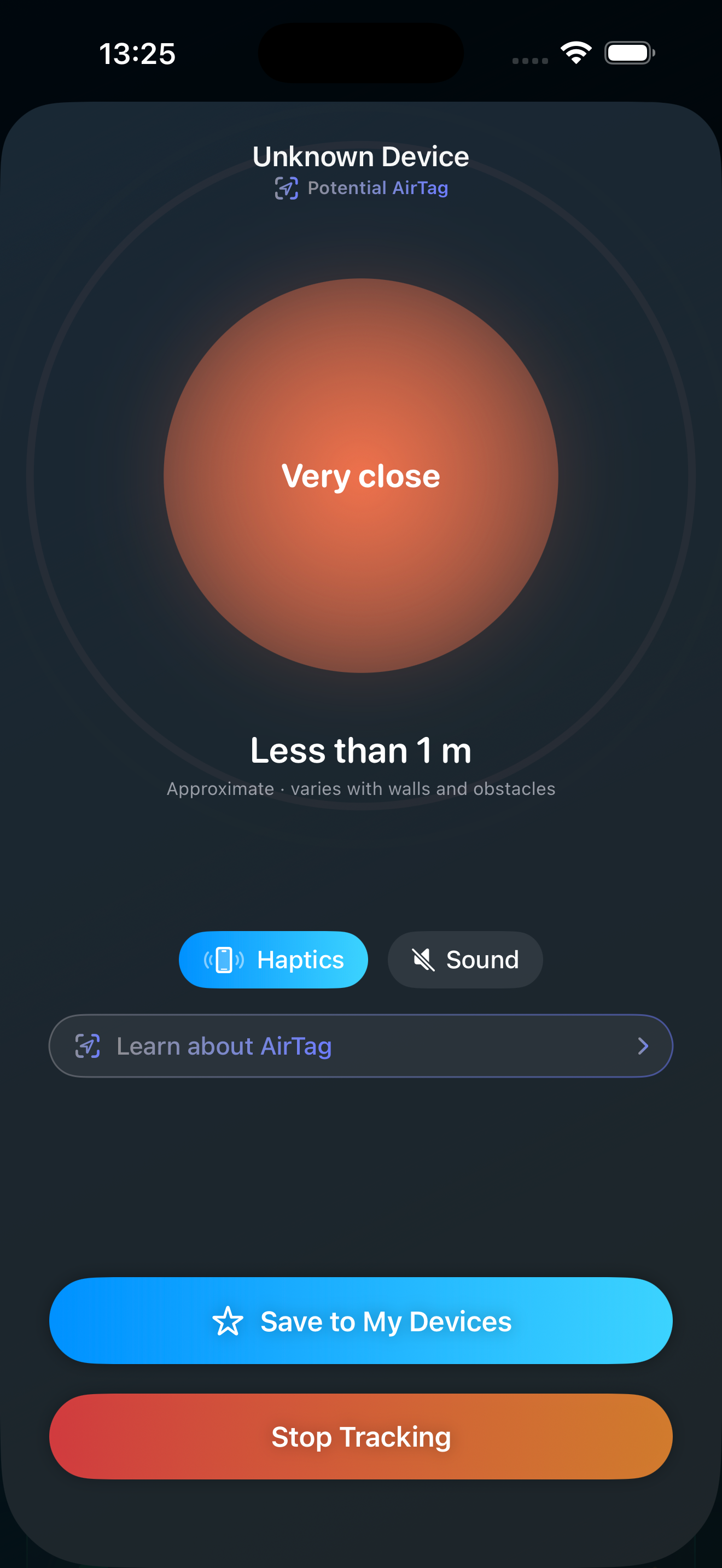
The core of the app is a warm and cold proximity finder. As you move toward the tracker the signal climbs and the app guides you in with haptics and sound, and as you move away it cools off. That turns a vague worry into a concrete search you can finish. TraceIt detects AirTag and AirTag style devices, Samsung SmartTag and SmartTag2, Tile, Chipolo, and other Bluetooth trackers. You can also save your own devices so they are never flagged again.
TraceIt is free to download, and the full finder is unlocked with the TraceIt Pro subscription.
Step by step: locate the AirTag physically
Start by reducing the search area. Use the live signal strength in TraceIt, or Find My if iOS has flagged the tag, and move slowly through the space while watching the reading. Walk room to room or section to section and note where the signal gets stronger. The proximity finder warms up as you close in and cools as you move away, so let it steer you.
Making the AirTag play a sound helps a lot once you are close. If you have access to it through Find My, you can trigger its tone, then follow your ears for the final few feet. On a newer iPhone with Ultra Wideband, Precision Finding can point you in an exact direction with distance, which is the fastest way to pin it down.
If you have an older iPhone without Ultra Wideband, you do not get the directional arrow, but you are not stuck. Lean on play sound plus the live signal strength reading and search by getting warmer and colder. It takes a little more patience, but it reliably gets you there.
How to find a hidden AirTag in your car, bag, or clothing
Trackers get tucked into a small set of predictable places. In a car, check the wheel wells, under and between the seats, inside the glovebox and center console, the trunk including under the floor mat and around the spare tire, and tucked into seat back pockets or under floor mats. Move slowly through each area while watching the signal so you know which part of the car to focus on.
On your person and your gear, check jacket and bag pockets including inner liners and zip compartments, the bottom of a purse or backpack, wallet sleeves, and anything that was recently gifted or handed to you. An AirTag is about the size of a coin, so it can hide in surprisingly small spaces.
If the tracker is silenced or its speaker has been tampered with, you will not be able to rely on sound. That is exactly when a Bluetooth signal scan earns its place, because the device still broadcasts even when it cannot beep.
Identify the owner before you act
Once you have the AirTag in hand, you can often learn something about who set it up. With most iPhones and many other NFC phones, holding the top of your phone near a found AirTag opens a page that can show the last few digits of the owner's phone number, which may help you recognize whether it belongs to someone you know.
Each AirTag also has a serial number, which can be relevant if you involve the authorities. Before you change anything, it is worth taking photos of the tag, where you found it, and any owner details that appear, so you have a record.
Knowing the owner matters. Sometimes the explanation is innocent, like a tag that fell off a friend's keys into your shared car. Sometimes it is not. Documenting first keeps your options open either way.
How to disable or remove an AirTag
An AirTag is disabled by removing its battery. Press down on the polished steel back and turn it counterclockwise, lift the cover off, and take out the round coin cell battery. Once the battery is out, the AirTag can no longer broadcast its location.
Before you do this, document what you found. Photograph the tag, its location, and any owner information you were able to see. If you believe someone placed it to track you without your consent, removing the battery stops the tracking, but the evidence of where and how it was hidden can still matter later.
Use your judgment about timing. If you feel you are in danger, your safety comes first, and you may prefer to involve law enforcement before handling the device.
What to do if you feel unsafe
If you believe someone is tracking you without your consent, treat it as a safety issue, not just a tech problem. Tracking a person without their knowledge or consent is illegal in many places, and you are within your rights to involve the authorities.
Consider contacting local law enforcement, especially if you can show the tracker, where you found it, and any owner details. The serial number and your photos can help. If you are in immediate danger, get to a safe place and call emergency services.
A detector like TraceIt helps you confirm what is happening and find the device, but it is one part of staying safe. Lean on the people and resources around you too.
Lost your own AirTag? Find it nearest first
If the AirTag is yours and you simply misplaced it, the search is more relaxed but the mechanics are the same. Apple's Find My is the natural starting point, since your own tags appear on the map and you can play a sound or use Precision Finding on a supported iPhone.
For the last stretch, when you are in roughly the right room but cannot see the tag, the warm and cold proximity finder is what closes the gap. TraceIt ranks nearby Bluetooth devices nearest first and guides you in with the same signal strength, haptics, and sound, which is handy for the final few feet where a map alone is not precise enough.
The same approach works for any Bluetooth device you have lost, not just AirTags, including AirPods, headphones, and speakers.
Beyond AirTags: other Bluetooth trackers
AirTags are not the only trackers people are followed with. Samsung SmartTag, SmartTag2, Tile, Chipolo, and a range of other Bluetooth trackers all work in similar ways, and an iPhone will not always flag them the way it flags an AirTag.
TraceIt scans for all of these. It looks at the Bluetooth devices around you, flags the suspicious ones, and shows the likely brand so you know what you are dealing with. Built in explainers help you understand each brand. If your concern is being followed, scanning for every kind of tracker, not just AirTags, gives you a fuller picture.
One honest note: on iPhone, owner present AirTags are silent on Bluetooth and iOS strips some Apple specific data, so no app can reliably brand every AirTag by name on an iPhone. TraceIt still surfaces AirTag style devices as suspicious, and it identifies the other major brands directly.
Privacy: everything runs on your device
Scanning for trackers is sensitive, so TraceIt keeps it local. The scanning happens on your device, there is no account to create, and nothing about you is uploaded. You do not trade your privacy to protect it.
That matters most in exactly the situation this page is about. If you are worried someone is watching where you go, the last thing you want is a tool that quietly collects the same information. TraceIt is built so the search stays between you and your iPhone.