

What "find a tracker" really means
When people search for how to find a tracker, they usually mean one of two very different devices. The first is a Bluetooth tag like an AirTag, Samsung SmartTag, Tile, or Chipolo. These are small, cheap, and broadcast a short-range Bluetooth signal that a nearby phone can pick up. The second is a GPS tracker, which is a different kind of device that reports its own location over a cellular network rather than chatting with nearby phones.
This distinction matters because it sets honest expectations. A phone and an app can scan for and home in on Bluetooth tags because those devices are actively broadcasting nearby. A silent, hardwired GPS tracker does not announce itself over Bluetooth, so no phone app can reliably find it, and a physical search or a professional sweep is the right tool for that job.
TraceIt is built for the Bluetooth side, which is by far the most common case for personal tracking today. It scans the Bluetooth devices around you, flags the ones that look like trackers and are not yours, and guides you to the exact spot the device is hidden.
How to find a hidden Bluetooth tracker, step by step
Start by getting still. Step away from crowds and other people's phones and gadgets so the scan can focus on what is actually near you. Open TraceIt and let it scan the nearby Bluetooth devices. It lists what it sees and flags the suspicious ones, with the likely brand and a live signal reading.
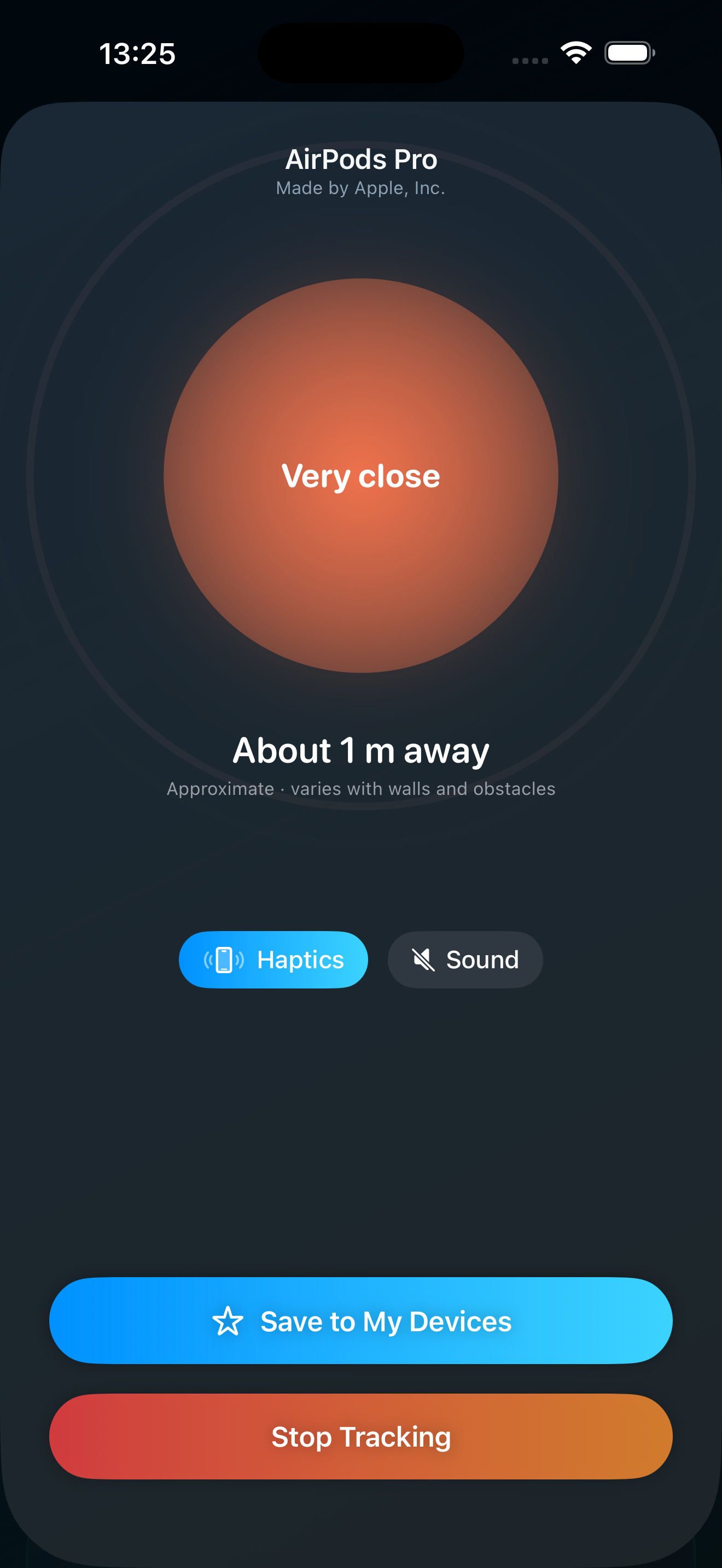
Next, pick the device that does not belong to you and watch its signal strength. A stronger signal means the tracker is closer. Move slowly through the space and watch how the reading changes. As you get warmer, the proximity finder responds with haptics and sound so you can keep your eyes on your surroundings instead of the screen.
Follow the warm and cold cues until you are right on top of the device, then search that small area by hand. Trackers are small, so check seams, pockets, linings, and tight gaps. Once you find the device, the next section covers what to do with it safely.
Scan nearby devices and read live signal strength
The core of finding a hidden tracker is seeing what is broadcasting around you and judging how close each device is. TraceIt scans nearby Bluetooth devices and shows them with a live signal strength reading that updates as you move. Devices that look like trackers and are not saved as yours get flagged so you know where to focus.
Signal strength is a practical guide, not a precise distance. Walls, metal, bags, and car panels all affect the reading, so treat it as warmer or colder rather than an exact measurement in feet. The trick is movement: take a few steps, watch the reading respond, and let the trend point you toward the device. Combined with the proximity finder, this is how you turn a vague worry into a real location.
Walk warm and cold to the exact hiding spot
Once you have identified the device that is not yours, the proximity finder helps you close in on it. As you get nearer the signal climbs, and TraceIt responds with haptics and sound that get more intense as you warm up and ease off as you move away. This lets you sweep an area, a car seat, or a bag without staring at the screen.
Work methodically. Sweep slowly across the space and notice where the cues peak, then narrow your search to that spot and check the obvious hiding places nearby. Because Bluetooth signals bounce around enclosed spaces like car interiors, take your time and confirm the hottest point from more than one angle before you start pulling things apart.
If the tracker supports it, making it play a sound can help you pinpoint it in a cluttered space, which TraceIt can guide you toward where the device allows.
Trackers TraceIt can detect
TraceIt detects unknown Bluetooth trackers, including AirTag and AirTag-style devices, Samsung SmartTag and SmartTag2, Tile, Chipolo, and other Bluetooth trackers. For each flagged device it shows the likely brand and a live signal reading, and it includes short "Learn about [brand]" explainers so you understand what you are looking at.
One honest note about Apple AirTags on iPhone. Because of how iOS handles Apple device data, brand identification for AirTags specifically is limited on an iPhone, and an AirTag traveling with its owner stays silent by design. The other supported brands are detected normally. This is exactly why a dedicated scanner that watches live signals matters, rather than relying only on a single automatic system alert.
Why your iPhone's built-in alert is not enough
iPhones do have a built-in unwanted tracking alert, and it is useful, but it has real gaps. It can take time to fire, often hours after a device has been traveling with you, which is little help in the moment you actually feel unsafe. It also stays quiet when the tracker's owner is nearby, since the system assumes the device is simply with its owner.
The built-in alert is also focused on AirTags and the Find My network, so other Bluetooth trackers may not trigger it at all. That leaves a wide gap for SmartTags, Tiles, Chipolos, and similar devices.
A dedicated scanner closes that gap. Instead of waiting for an automatic warning, you can actively scan on demand, see the devices around you right now, and walk to the one that is not yours. That is the difference between hoping for an alert and taking control of the search yourself.
What to do when you find a tracker that is not yours
Finding a tracker can be unsettling, so move carefully. If you feel you may be in danger, prioritize your safety first and consider getting to a safe place and contacting local authorities. A tracker that is not yours can be evidence, so it is often wise to document it with photos and notes about where and when you found it before you change anything.
You do not have to disable a device immediately, and in some situations leaving it in place while you reach safety or speak to police is the safer choice. If you do decide to disable a Bluetooth tag, most can be turned off by removing the battery. Local laws and your specific situation matter, so treat this as general guidance rather than legal advice.
If the situation involves an ex-partner, ongoing harassment, or stalking, consider reaching out to a domestic violence or victim support service. They can help with safety planning beyond just the device itself.
Save your own devices and find lost gear too
To keep scans clean, you can save your own devices in TraceIt so they are never flagged again. Over time this means your scans surface only the things that are genuinely unexpected, which makes a real tracker much easier to spot.
The same proximity finder also works for finding your own lost Bluetooth gear. AirPods, headphones, speakers, and other Bluetooth devices show up ranked nearest first, and you can use the same warm and cold finder, with haptics and sound, to walk to whatever you misplaced.
Everything runs on your device. Scanning happens on-device with no account to create and nothing about you uploaded, so checking whether something is tracking you is private by default. TraceIt is free to download, with a Pro subscription that unlocks the full finder.